
MIS Department Policy & Procedure
Description
Frank has a series of tasks that it performs in order to complete Truepoint, Point and Pay, and Oakland County Processes. This document describes each process and what it does. No matter what happens, do not log off rh\truepointsvc via RDP, as this account needs to be logged in for almost all of these processes.
BS&A Processes
Deprecated - this is now taken care of through PDQ Deploy. -EK 05-24-2023 Directory Monitor - Frank must be logged in as rh\truepointsvc for this process to complete. This process monitors the BS&A Cash Receipting setup program and checks for updates to the setup program. If it detects an update, it then automatically runs the setup program to update Cash Receipting.
This program is automatically started when the truepointsvc account is logged on.
The shortcut that automatically starts the program is located here: C:\Users\truepointsvc\AppData\Roaming\Microsoft\Windows\Start Menu\Programs\Startup
Truepoint Processes
Truepoint Export for Cash and Check payments made to counter staff - Frank must be logged in as rh\truepointsvc for this process to complete.
This is a scheduled task on Frank called “Truepoint Export” and executes the powershell script \\colpotter\scripts$\TruepointExport\TruepointExport.ps1.
The task runs at 7:00pm nightly.
The task creates a new version of the file \\colpotter\fin\TRETRANSFER\Payments\BSAW&S.csv.
\\colpotter\fin\TRETRANSFER\Payments\BSAW&S.csv contains the cash and check payments for utility billing accounts for the current day.
The export task defaults to the current date if no date parameters are given. Because of this, the export task must run before midnight in order to capture the current day's payments. If it is run after midnight there will be no payments to export because the task will default to the next day.
In the morning, Treasury receives info from the bank with the credit card payments for utility bills. They copy and paste that info into the \\colpotter\fin\TRETRANSFER\Payments\BSAW&S.csv file.
The file then contains all payments made on utility bills from the previous day.
Accounting then imports that file into Truebill to update Truebill with the payments made the previous day.
\\colpotter\fin\tretransfer\payments\BSAW&S.csv is then archived to \\colpotter\fin\tretransfer\payments\Archive - 3 months plus current\
IMPORTANT: If the Truepoint Import runs before the Truepoint Export or if the export does not run at all although the import runs, the import task clears out the payment data needed by the export routine and it is lost. A restore of the previous day database into a new database needs to be done to extract the payment data.
In order to do this, you must restore the correct D012 database backup in SQL from D:\SQLBACKUP to a new database. Choose to name the database something you’ll remember. It must be preceded by D012 (i.e D012TestEK).
Open Cash Receipting.net and log in as User: bsareset Pass: bsareset It will then prompt you for the user credentials. Delete bsareset from the user field and replace it with username TP (this is the account that is used for the export). The password is in Dashlane. It will now log you in.
It will ask you to select an active database. Choose the database that you restored to and click “OK”.
Now, complete the export manually. Go to File -> Export -> Generic Receipt Item Data Export
Under the “Export” dropdown, make sure TruePoint is selected. Choose the correct dates and export the file to \\colpotter\fin\TRETRANSFER\Payments\BSAW&S.csv
Check with treasury to make sure this is the data they needed.
Make sure to repeat steps ii and iii to revert the database back to the production RochesterHills database. Delete the restored database once you receive confirmation from Treasury.
Truepoint Import (Imports amount due to BS&A so that counter staff knows how much people owe) - Frank must be logged in as rh\truepointsvc for this process to complete.
This is a scheduled task on Frank called “Truepoint Import” and executes the powershell script \\colpotter\scripts$\TruepointImport\TruepointImport.ps1
This task runs at 4:00am each morning.
The task follows the Truepoint Export scheduled task. It imports the file from Frank in E:\Transfers\Truepoint\CashieringDaily.csv
The file E:\Transfers\Truepoint\CashieringDaily.csv is created at 7:00pm by a SQL Server Agent Job on TruebillSQL.
Within the SQL Server Management Studio on TruebillSQL navigate to TruebillSQL/SQL Server Agent/Jobs/CashieringDailyExport to view the job.
This import updates the BS&A Cash Receipting application with the new W&S bill amounts that are due.
This import also clears out the payment data that is exported by the Truepoint Export task above.
The /ClearTable=true appears to clear some other data. Setting to false has no effect on the deleting of the payment data needed for the export described above.
E:\Transfers\Truepoint\CashieringDaily.csv is then archived by the Powershell script to E:\Transfers\Truepoint\Archive
IMPORTANT: Do not run the import task without being sure to run the export first and then save the export file created so it can be combined with the export file created when the task runs at the normal time. Running the import task without first preserving the payment data will result in payments not being imported into Truepoint to update the customer portal.
Point and Pay Processes
Point and Pay Upload - Frank must be logged in as rh\truepointsvc for this process to complete.
This is a scheduled task called “Upload Point and Pay export” on Frank and executes the powershell script \\colpotter\scripts$\TransferPointAndPay\TransferPointAndPay.ps1
The task runs at 7:35pm each night.
The task uses the file E:\Transfers\Truepoint\CashieringDaily.csv from the Truepoint Import process described above. It makes a copy of the file and renames it to E:\Transfers\Truepoint\pointandpay\Daily_($currentdate).csv
The new file is then uploaded via SFTP to vendor.paydici.com using WinSCP commands in the powershell script.
Upon successful completion, the file is then archived into the following folder: E:\Transfers\Truepoint\pointandpayarchive
If a transfer problem occurs, it could be because of a bad SSH key. Check the logs on Frank under E:\Logs. A bad log file will have this in it:
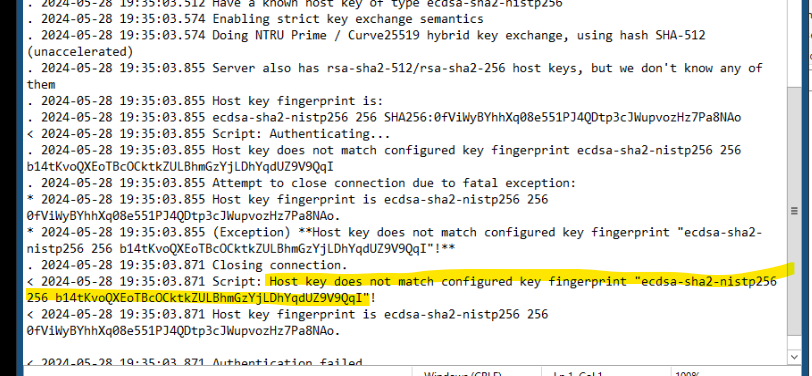
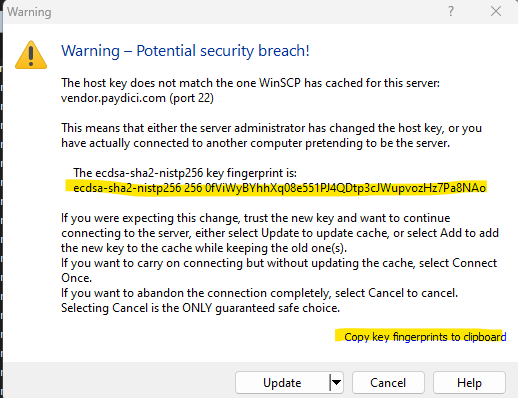
Try to log in to the SFTP site using WinSCP (credentials are in the script). Compare the SSH key from WinSCP with what is in the script. If they don’t match, use the “Copy key fingerprints to clipboard” to copy the key and then update the script with the new SSH key.
Oakland County Assessing Processes
Assessing Transfer to Oakland County - Frank must be logged in as rh\truepointsvc for this process to complete.
This is a scheduled task called “AssessingTransferToOaklandCounty” on Frank and executes the powershell script \\colpotter\scripts$\AssessingTransferToOaklandCounty\AssessingTransferToOaklandCounty.ps1
The task runs at 6:30pm once every Thursday.
It exports 4 files from BS&A Assessing.net:
E:\Transfers\AssessingTransferToOaklandCounty\Legals.Txt
E:\Transfers\AssessingTransferToOaklandCounty\Names.Txt
E:\Transfers\AssessingTransferToOaklandCounty\Values.Txt
E:\Transfers\AssessingTransferToOaklandCounty\XAddr.Txt
These four files are then uploaded to ocmove.oakgov.com using WinSCP commands in the powershell script.
Oakland county requires that the password for their SFTP site be changed every 90 days. (Instructions for PW change in Dashlane. Search: Oakland County SFTP Site)
Once the password has been changed with the county, make sure to edit the password in the script here: \\colpotter\scripts$\AssessingTransferToOaklandCounty\AssessingTransferToOaklandCounty.ps1
This command contains the password for Oakland County in the script: “open sftp://sftprochesterhills%40oakgov.com:password@ocmove.oakgov.com/ -hostkey=`"`"ssh-rsa 2048 9T2i+6On1RabGUKcMmOH/96ZtMC49BiHaQZbBi3mo7k`"`"" `
Was this article helpful?
That’s Great!
Thank you for your feedback
Sorry! We couldn't be helpful
Thank you for your feedback
Feedback sent
We appreciate your effort and will try to fix the article