
MIS Department Policy & Procedure
[Fix] Can’t Install Microsoft .NET Framework 3.5 in Windows 8 and Later
We know that Windows 8 and later operating systems don't come with Microsoft .NET Framework 3.5 but there are many 3rd party software programs which require .NET Framework 3.5 installed in Windows.
But there are a few people who have faced problems while installing .NET Framework 3.5. When they try to install it, they receive error messages such as the source files could not be found or downloaded, etc. These error messages contain different error codes such as 0x800F081F or 0x800F0906.
FIX:
This solution should work for all devices whether its a Desktop PC, laptop or Surface tablet running on Windows 8, Windows 8.1 or Windows 10 operating systems.
If you are also facing problems while installing .NET Framework 3.5 in Windows 8 or later, check out following method to fix the issue:
Type gpedit.msc in RUN or Start search box and press Enter. It'll open Group Policy Editor.
Now go to:
Computer Configuration -> Administrative Templates -> System
In right-side pane, look for "Specify settings for optional component installation and component repair" option.
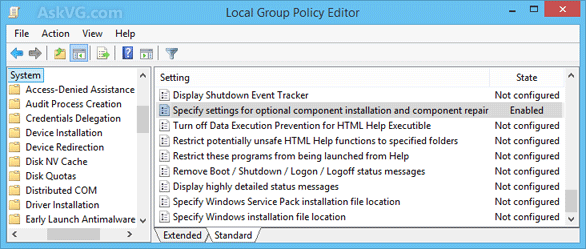
The option would be set to Not Configured. Double-click on it, set it to Enabled and enable "Contact Windows Update directly to download repair content instead of Windows Server Update Services (WSUS)" option.
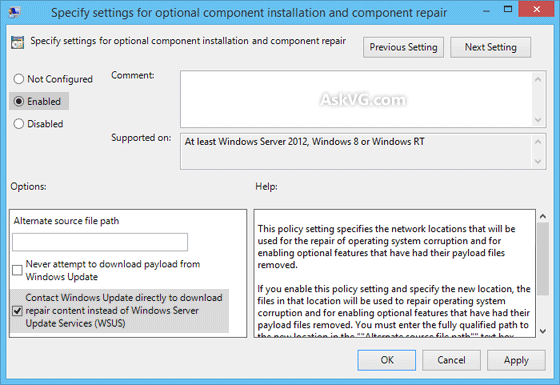
That's it. Now try to install .NET Framework 3.5 again using Control Panel -> Programs and Features or by using DISM command and now you'll not face any problem.
Was this article helpful?
That’s Great!
Thank you for your feedback
Sorry! We couldn't be helpful
Thank you for your feedback
Feedback sent
We appreciate your effort and will try to fix the article