
MIS Department Policy & Procedure
Installing Legistar 5
Most users will be able to use the new Web Portal for Legistar for all their work once we upgrade. For those users who need to have the application installed (check with Kevin before installing):
The PC must have .Net 3.5 installed . In Windows 7, add it from Control Panel/Programs and Features/Turn Windows Features on or off and select Microsoft.NET Framework 3.5.1)
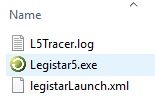
Copy the following files from another user who has the full, installed version and paste into same location on new user's computer
Program Files\Daystar\legistar5
Mount a Windows 10 ISO. Then, from an administrative command prompt, run the following command: DISM /Online /Enable-Feature /FeatureName:NetFx3 /All /LimitAccess /Source:d:\sources\sxs
Note: Menus sometimes open behind other windows.
Run legistar5.exe
Type in www.legistar1.com for server name (this is found in the C:\Program Files\Daystar\Legistar5\LegistarLaunch.xml file)
Login when prompted, selecting "Remote" and the Database should show up as "ROCH1715".
The install places an icon on their desktop, Start bar, and in the Programs\Daystar folder on the programs menu.
Was this article helpful?
That’s Great!
Thank you for your feedback
Sorry! We couldn't be helpful
Thank you for your feedback
Feedback sent
We appreciate your effort and will try to fix the article