
MIS Department Policy & Procedure
Description
We may find that certain websites need to be added to IE compatibility mode in Edge, particularly if the developer hasn’t updated the site.
Instructions
As an administrator, open the following file in Notepad: \\rh.gov\NETLOGON\EdgeIECompatibility\sites.xml
Duplicate the following format for the website in question in the XML file:
<site url="yoursite.com">
<compat-mode>Default</compat-mode>
<open-in allow-redirect="true">IE11</open-in>
</site>
Save the file.
If the user needs this update to take place immediately, log into their system remotely and open Edge.
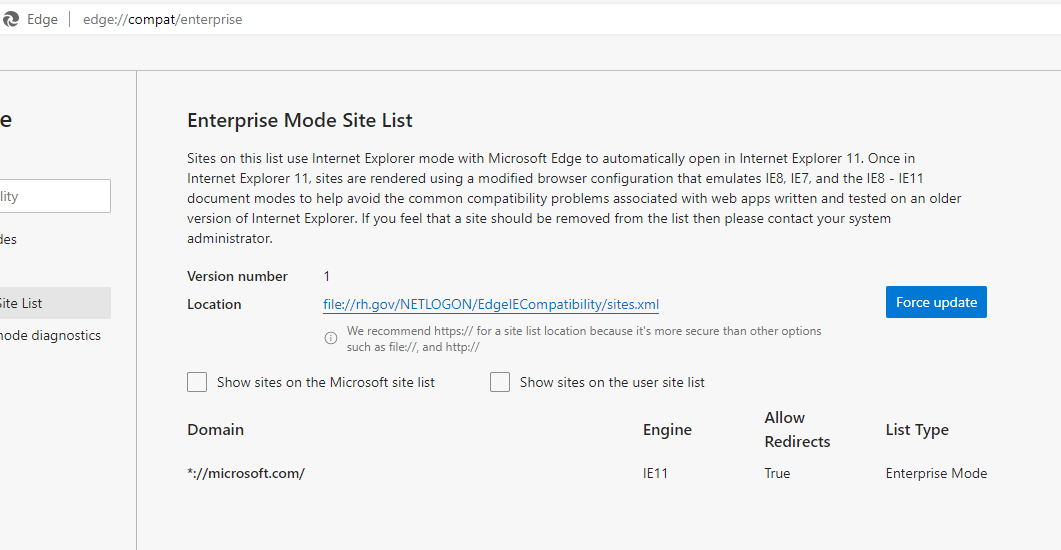
Navigate to the following URL: edge://compat/enterprise
Click the “Force update” button:
Was this article helpful?
That’s Great!
Thank you for your feedback
Sorry! We couldn't be helpful
Thank you for your feedback
Feedback sent
We appreciate your effort and will try to fix the article