
MIS Department Policy & Procedure
Truebill- Cash Receipting Import and Export
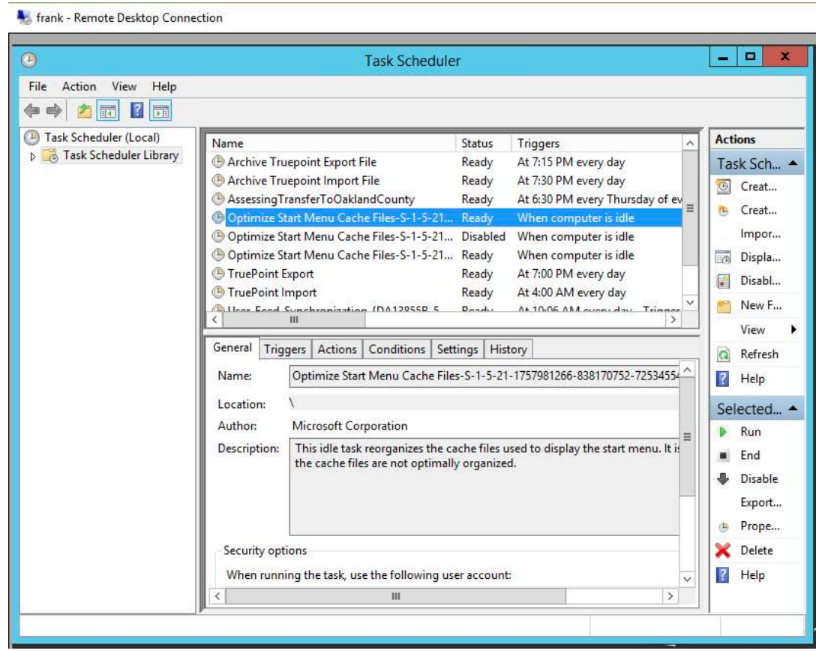
There are four scheduled tasks running on server Frank related to the transfer of data between these two systems.
Truepoint Export
Truepoint Import
Archive Truepoint Export File
Archive Truepoint Import File
Truepoint Export
Runs at = 7:00pm every evening. (It must run before midnight)
Action = "(:\Program Files (x86)\BS&A Software\Cash Receipting\CashReceipting.exe"
Arguments = /u =TP
/p=cash#import /RunTruePointExport= "\ \colpotter\fin\TRETRANSFER\Payments\BSAW&S.csv"
/CRGenericExport=TruePoint
The task runs at night and creates a new version of the file BSAW&S.csv
The file when created contains the cash and check payments for utility billing accounts for the current day.
The export defaults to the current date if no date parameters are given. Because of this the export task must run before midnight in order to capture the current days payments. If it is run after midnight there will be no payments to export because the task will default to the next day. In the morning Treasury receives info from the bank with the credit card payments for utility bills.
They copy and paste that info into the BSAW& S.csv file.
The file then contains all payments made on utility bills from the previous day.
Accounting then imports that file into Truebill to update Truebill with the payments made the previous day.
IMPORTANT: If the Truepoint Import runs before the Truepoint Export or if the export does not run at all although the import runs, the import task clears out the payment data needed by the export routine and it is lost. A restore of the previous day database into a new database needs to be done to extract the payment data.
Truepoint Import
Runs at = 4:00am every morning
Action = "C:\ Program Files (x86)\BS&A Software\Cash Receipting\CashReceipting.exe"
Arguments= /u=TP /p=cash#import /RunTruepointlmport="E:\Truepoint\CashieringDaily.csv"
/lmportName= Truepoint /ClearTable=true
This task runs at night. It imports the file from Frank in e:\Truepoint\ CashieringDaily.csv
This file updates the BS&A Cash Receipting application with the new W&S bill amounts that are due.
This import task also clears out the payment data that is exported by the Truepoint Export task above.
The /ClearTable=true appears to clear some other data . Setting to false has no effect on the deleting of the payment data needed for the export described above.
IMPORTANT: Do not run the import task without being sure to run the export first and then save the export file created so it can be combined with the export file created when the task runs at the normal time.
Running the import task without first preserving the payment data will result in payments not being imported into Truepoint to update the customer portal.
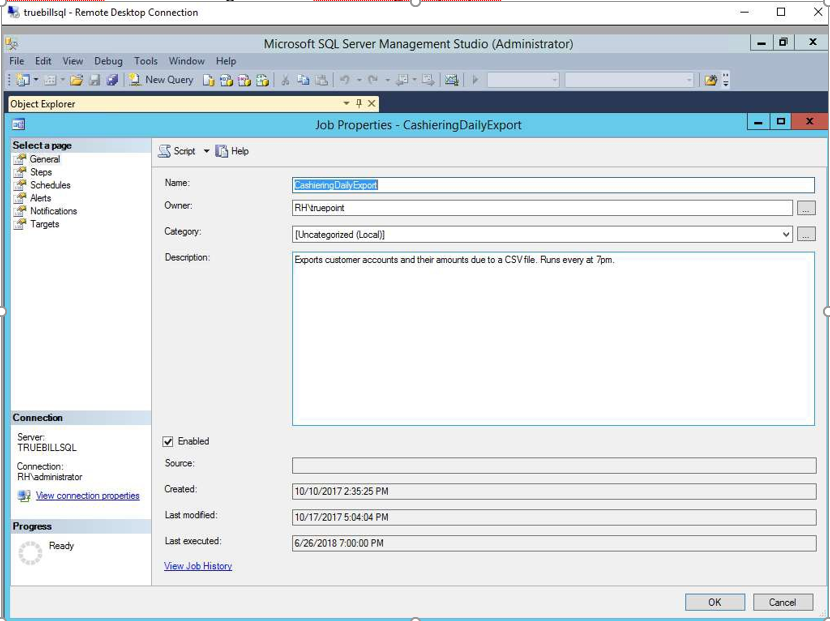
This file cashieringdail y.csv is created at 7:00pm by a SQL Server Agent Job on True billSQL. Within the SQL Server Management Studio on TruebillSQL navigate to
TruebillSQL/SQL Server Agent/Jobs/CashieringDailyExport
Archive of These Files
Both of these files are copied into an archive subfolder within each of their respective folders adding the date and time to the file name. This is accomplished by two additional tasks on Frank called:
Archive Truepoint Export File
Runs at = 7:15pm every evening
Action = C:\Batch\ArchiveExport.bat
Archive Truepoint Import File
Runs at = 7:30pm every evening
Action = C:\Batch\Archivelmport.bat
Was this article helpful?
That’s Great!
Thank you for your feedback
Sorry! We couldn't be helpful
Thank you for your feedback
Feedback sent
We appreciate your effort and will try to fix the article