
MIS Department Policy & Procedure
Software and drivers are saved here: \\frank\bsa\EpsonDrivers\Epson Drivers
Run the following first: \\frank\bsa\EpsonDrivers\Epson Drivers\ISSetupPrerequisites\EpsonNetOPOS\setup.exe
See attached instructions for completing installation and setup of driver ports.
Once installed, open EQ Cash Receipting and choose the following from Program Setup:
Tab - 2. Program Settings => Workstation/Receipt Printer . . .
Make the following setting changes:
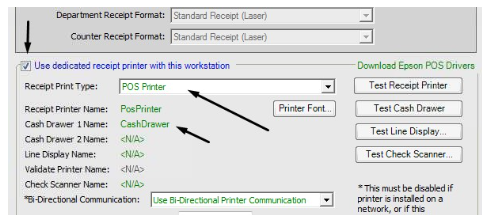
Then click "Test Receipt Printer" and "Test Cash Drawer."
CAUTION: Faster Receipt Printing (10/02/2018 mc)
The following setting was changed to allow for faster receipt printing, however, BS&A cautions against using this setting for the following reasons:
"When that option is checked, you will often get errors pertaining to the port being illegal or open and the only way to resolve that error is to reboot that computer. That option is causing the receipt printer to do something that it was not designed to do."
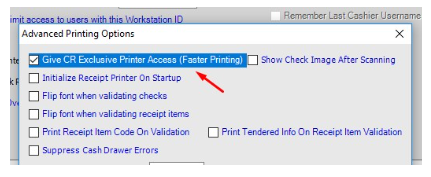
Treasury is aware of this issue and will keep an eye out for it. If they start to have this problem, they will uncheck the above box.
This setting can be found in Program Setup > Program Settings > Workstation/Receipt Printer . . . > Advanced Printing Options
Was this article helpful?
That’s Great!
Thank you for your feedback
Sorry! We couldn't be helpful
Thank you for your feedback
Feedback sent
We appreciate your effort and will try to fix the article