 MIS Department Policy & Procedure
Document Name: | Set up Epson DS-530 II | Document Type: | Procedure |
Written by: | Christopher Sandu | Date/Revision Date: | 02/27/2025 |
Epson DS-530 ll Setup
Install the Drivers and Utilities Combo Package Installer from: https://epson.com/Support/Scanners/DS-Series/Epson-DS-530-II/s/SPT_B11B261202?review-filter=Windows+11
Once done, search the windows search bar for “scan” and select Epson Scan 2.
Scanner should be detected, otherwise check device manager and troubleshoot as needed. Might need to remove and re-add the scanner (I/e delete it and unplug / plug back in).
In Epson Scan 2 change the “Scanning Side” to Single-Sided
Under Rotate select Auto
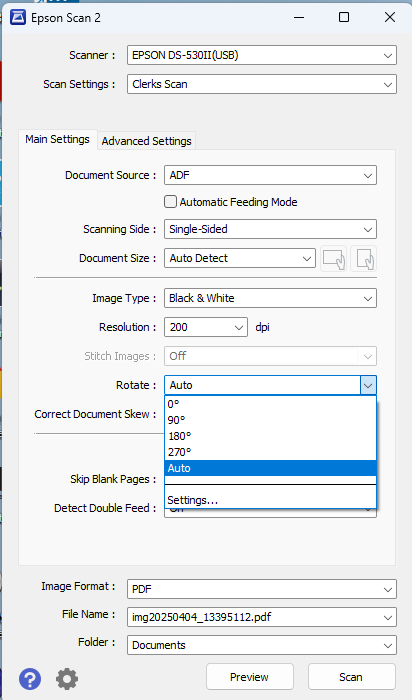
At the top, select “Scan Settings” and click “Save Current Settings”. Name the setting as needed.
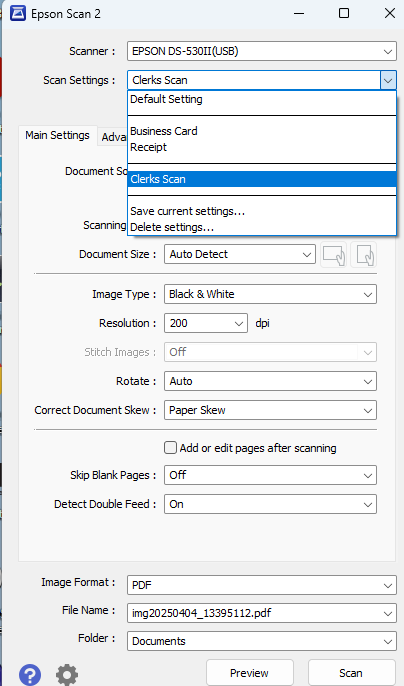
Select Folder, and choose the destination path.
Test scan
Was this article helpful?
That’s Great!
Thank you for your feedback
Sorry! We couldn't be helpful
Thank you for your feedback
Feedback sent
We appreciate your effort and will try to fix the article