
MIS Department Policy & Procedure
BSAOnline and Equalizer DB Changes
Each year in early April* the Assessing department creates the database for the next year. (Example: in 2025 they will create a database called Cityofrochesterhills2026)
When this happens you will need to notify the BS&A IT support team [sample email below] to let them know that they need to change AMG to point to this new database. However, we just want to see the new addressing changes that will be made in this database until the following February. We want the values to come from the previous year database. Then in February when Assessing actually rolls to the new year we want the values to display from the new database. Be sure to also notify the GIS Manager & Technician.
* Used to be in May, but was changed in 2025 to early April per Karen Somerville.
Sometime in February (third week) Assessing will want to display the new year values.
You will need to run the BSAOnline administrator app (saved in the MIS J: drive - see below) and change it to show the current year values.
In the BSAOnline administrative application you will need to login using the info in Bitwarden. Search for BSAOnline and use the rochesterhillsadmin account info. (\\colpotter\dat\Net\PROJECT\SOFTWARE\EQ\AccessMyGov-InternetServices\Site Administrator\BSAOnlineAdministration.exe)
Set the Active Unit to City of Rochester Hills.
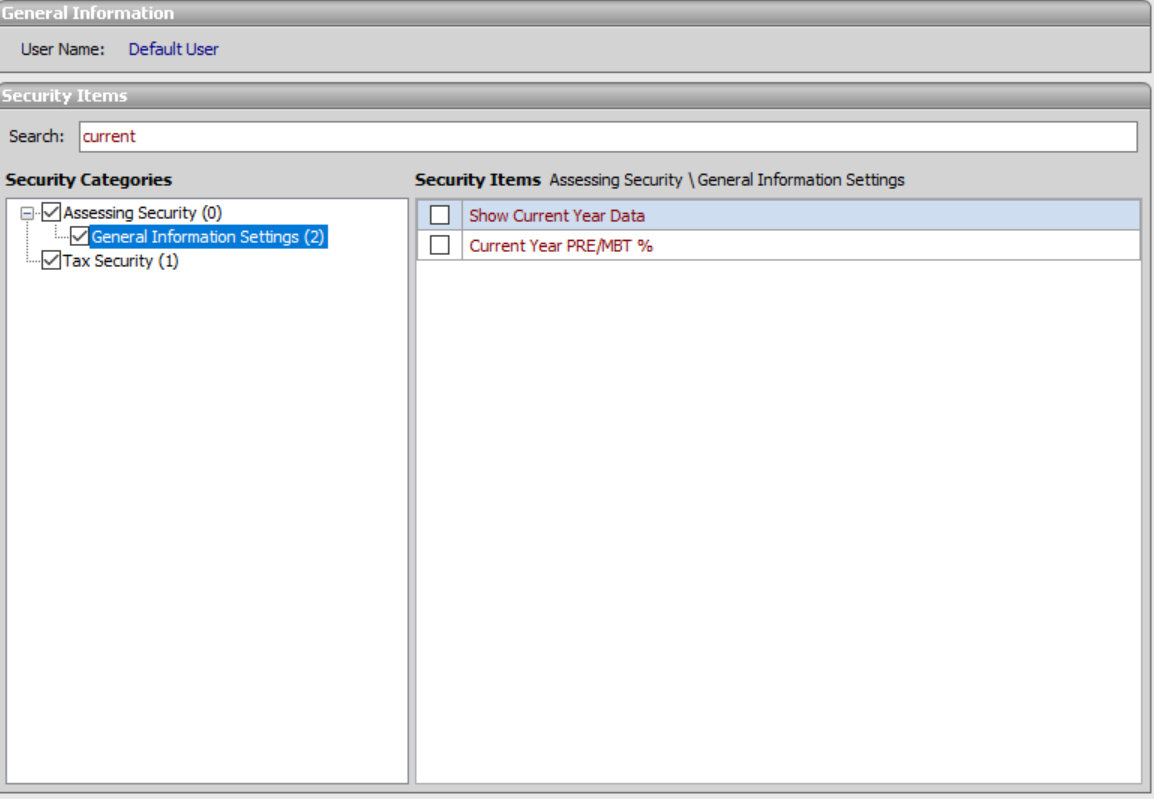
Click on User Setup>Edit Security Settings>Type "Current" in the Search feature at the top>Choose General Information Settings on left> Check both boxes "Show Current Year Data" and "Current Year PRE/MBT %"
This will cause it to show the values from the currently connected database.
Then log into the BS&A EQ server FRANK and open the Services application.
Look for the service called "BS&A Online Realtime Data Service (Aggregator)" and restart it.
That will restart 21 associated services.
Then ask Assessing to check to be sure the correct values are showing.
Sometime in early April when Assessing asks for this.
Call or email BS&A itsupport@bsasoftware.com and ask them to change our service to point to the new database created by Assessing.
In the BSAOnline administrative application you will need to login using the info in our dept password keeper. Search for BSAOnline and use the rochesterhillsadmin account info. (\\colpotter\dat\Net\PROJECT\SOFTWARE\EQ\AccessMyGov-InternetServices\Site Administrator\BSAOnlineAdministration.exe)
Set the Active Unit to City of Rochester Hills.
Click on User Setup>Edit Security Settings>Type "Current" at the top>Choose General Information Settings on left>Un-Check both boxes "Show Current Year Data" and "Current Year PRE/MBT %" (BS&A may make this change, but be sure to confirm it.)
This will cause it to show the values from the last year while showing other info from this year’s database.
Then log into the BS&A EQ server FRANK and open the Services application.
Look for the service called "BS&A Software AccessMyGov Realtime Data Service (Aggregator)" and restart it.
That will restart 21 associated services.
Then ask Assessing to check to be sure the correct values are showing.
The following steps are for GIS updates related to the database change and need to be done during the May database change after the database change has taken place.
Change to new database for the desktop EQ Assessing program on Frank
- Sign in to Frank
- Log into the Assessing module using the "export" login (pw in password keeper)
- Choose File > Database > Active Database and choose the new version
- Purpose: This ensures that the Thursday evening Equalizer export to Oakland County runs from the proper databaseNOTIFY GIS MANAGER & TECHNICIAN when all steps have been completed
Above steps were changed as of 3/26/2024; see final page of documentation for previous procedures.
Screen Shots
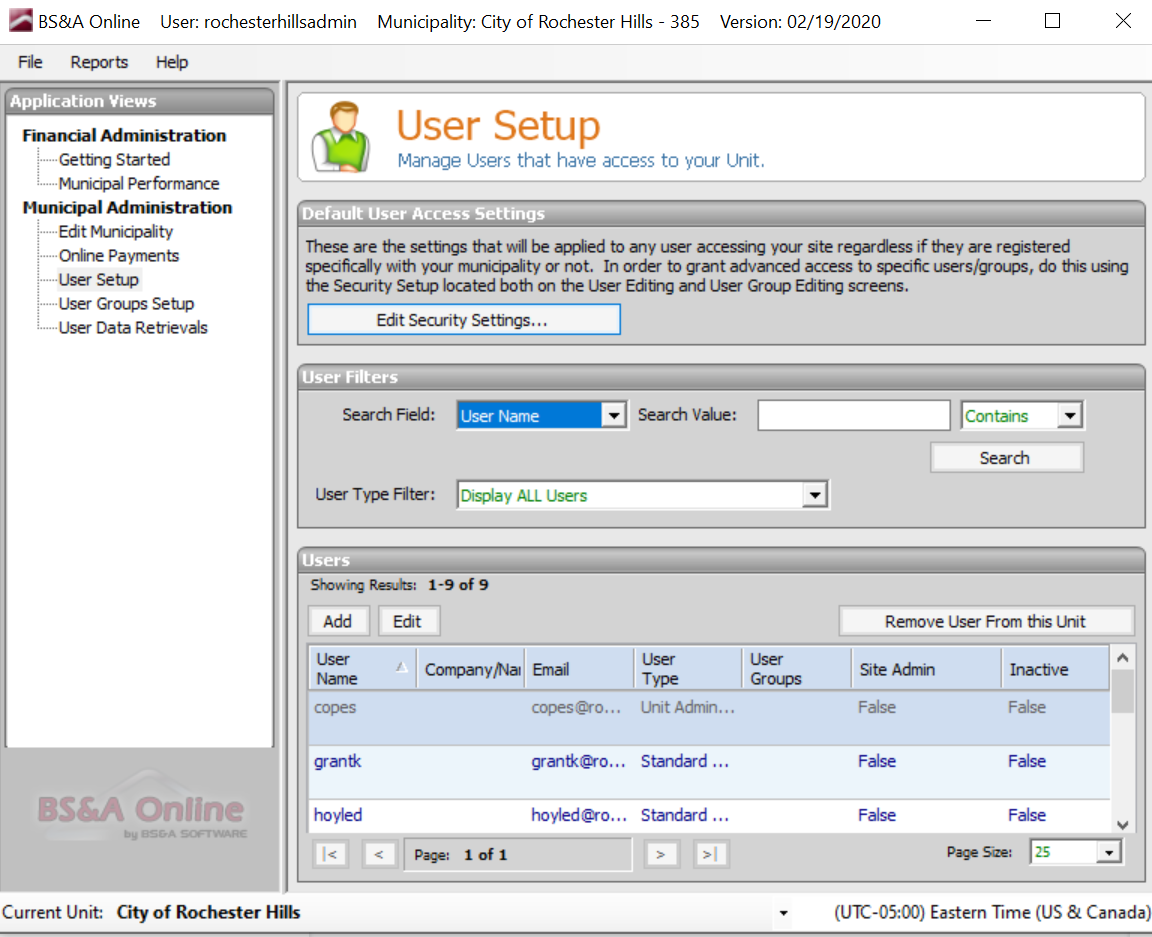
Click “User Setup” on the left menu and then click “Edit Security Settings” on this main application screen.
Then type “Current” in the search box and click “General Information Settings” in the left menu.
These two settings “Show Current Year Data and “Current Year PRE/MBT%” are turned ON in February and turned OFF in May.
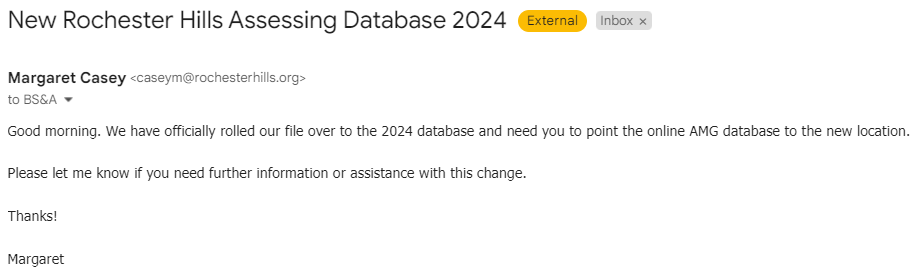
Sample Email to BS&A
Task Completion History
02/19/2020 KK-Karen S asked to implement the Feb change on 02/21/2020
02/21/2020 KK-Feb change implemented by KK requested by Karen S.
03/10/2021 MC-May change implemented by MC.
04/06/2023 MC-May change implemented by MC.
Procedure Update History
02/20/2020 KK-Updated document to reflect new method outlined by Margaret in 2019. Confirmed new procedure is correct and removed old procedure info. Service is now called BSAOnline.
OLD PROCESS REVISED 3/26/2024 PER LINDA KUHN UPON HER DEPARTURE
The following steps are for GIS updates related to the database change and need to be done during the May database change after the database change has taken place.
Change to new database for your desktop EQ Assessing program
NO LONGER NEEDED - OPEN THE .dtsx FILES USING NOTEPADNO LONGER NEEDED - Job File moved to \\Atlas\E$\SQLPackages\Removed Jobs
On Atlas, update job "UpdateVacantParcels" to the new database. Should be about line 35 of \\Atlas\E$\SQLPackages\VacantParcels.dtsxNO LONGER NEEDED - Job File moved to \\Atlas\E$\SQLPackages\Removed Jobs
On Atlas, update step 1, "UpdateParcelMaster" of "GISTuesdayUpdates" job to the new database. Should be about line 36 of \\Altas\E$\SQLPackages\ImportParcelMaster.dtsxNO LONGER NEEDED - Job File moved to \\Atlas\E$\SQLPackages\Removed Jobs
On Atlas, update step 2, "UpdateEQParcels" of "GISTuesdayUpdates" job to the new database. Should be about line 36 of \\Altas\E$\SQLPackages\ImportParcel.dtsxNO LONGER NEEDED - Job File moved to \\Frank\D$\SQLPackages\Removed Jobs
On Frank, update step 1, "ExportToPROPADDR" of "ExportToAtlasPROPADDR" job to the new database. Should be about line 35 of \\Frank\D$\SQLJobs\ToPROPADDRonAtlas.dtsxNO LONGER NEEDED - Job File moved to \\Frank\D$\SQLPackages\Removed Jobs
On Frank, update step 1, "ExportAddresses" of "ExportAddressesToSheriffDeedDatabase" job to the new database. Should be about line 35 of \\Frank\D$\SQLJobs\AddressesToSheriffDeeds.dtsx change to new databaseOn Frank change to new EQ database using "export" login (this ensures that the Thursday evening Equalizer export to Oakland County runs from the proper database)
NOTIFY GIS MANAGER & TECHNICIAN when all steps have been completed

Was this article helpful?
That’s Great!
Thank you for your feedback
Sorry! We couldn't be helpful
Thank you for your feedback
Feedback sent
We appreciate your effort and will try to fix the article