
MIS Department Policy & Procedure
Document Name: | Recover files from user’s Desktop on old computer | Document Type: | Procedure |
Written by: | Christopher Sandu | Date/Revision Date: | 2/25/2025 |
Recover files from user’s Desktop on old computer
If a user has had their computer replaced, and needs files recovered from their desktop please follow these steps:
- Locate the old and new asset tag for this user. Navigate and login to GLPI. Search for the users last name in the top right corner which should show you their old and new asset tag.
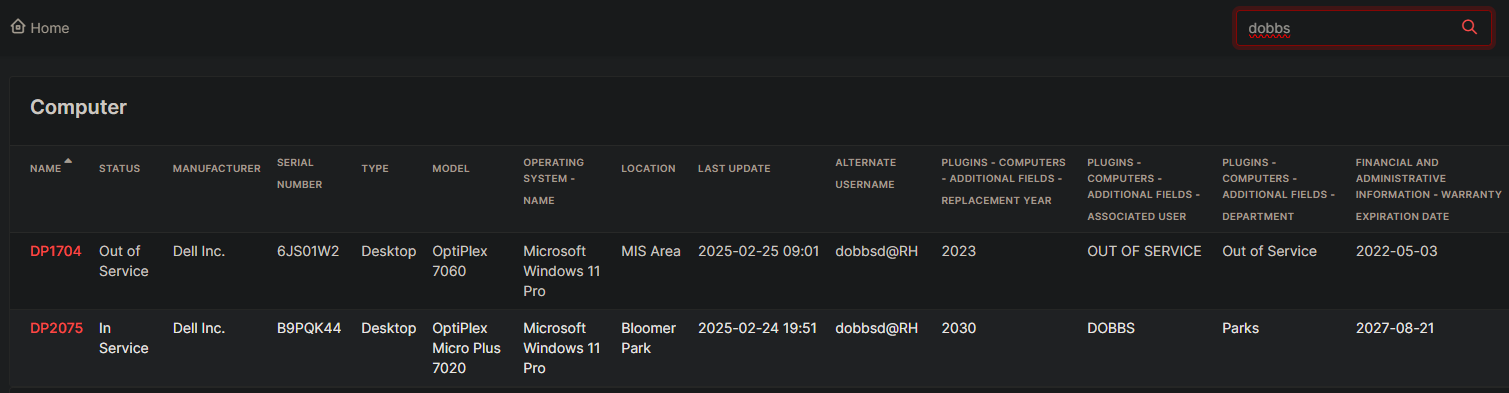
- Login to Colpotter. In the windows search bar, navigate to \\DP####\c$ (#### being the asset tag number of the old PC)
- Go to users>lastname first initial (ex. SanduC)>Desktop and copy all files.
- Then, in a different instance of file explorer side by side go to \\dp####\c$ (#### being the asset tag number of the new PC)
- Follow the same path to get to the desktop, paste all files.
Was this article helpful?
That’s Great!
Thank you for your feedback
Sorry! We couldn't be helpful
Thank you for your feedback
Feedback sent
We appreciate your effort and will try to fix the article