
MIS Department Policy & Procedure
Microsoft LAPS (Local Administrator Password Solution)
Introduction
In order to maintain security between workstations, we have implemented Microsoft’s LAPS solution. This generates a unique password for the local MIS admin account on each workstation.
Background
This is implemented in two ways, primarily:
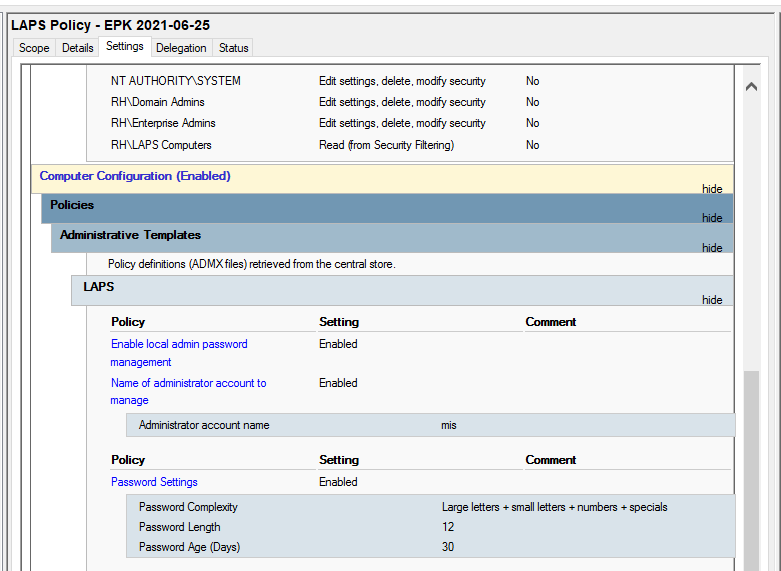
Group Policy - a new administrative template was installed in the central store that allows for us to administer this policy. See below:
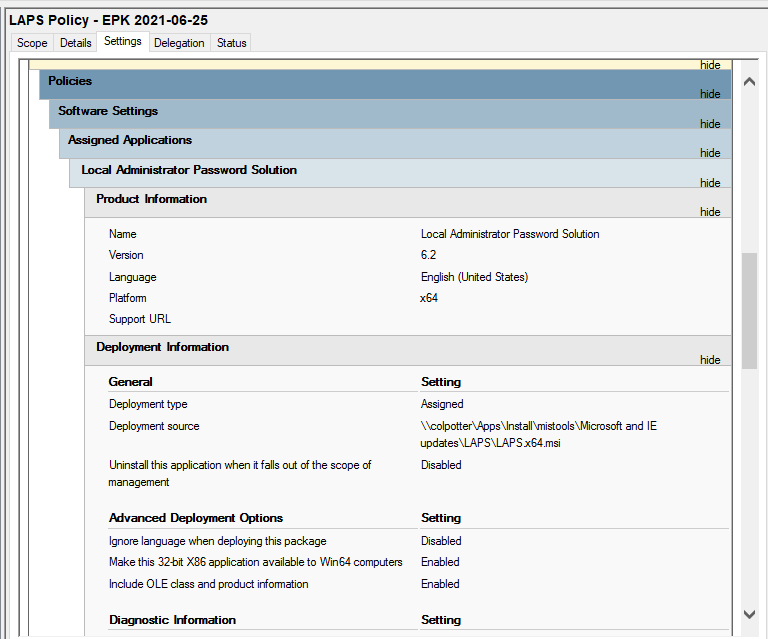
Client Installation - This was initially pushed out via PDQ Deploy to speed the implementation process. However, we now have added this to group policy referenced above:
Usage
Finding the local administrator password for a computer is relatively easy. Log into a domain controller (currently either “beans” or “corn”) as your domain administrator account.
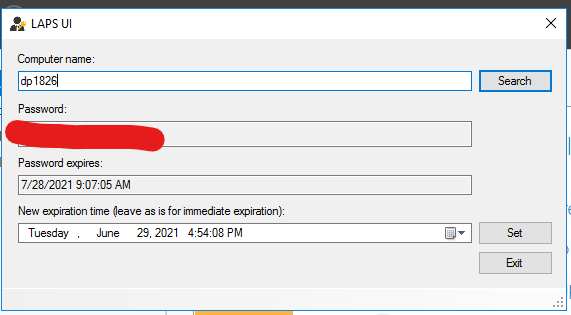
Then, run the LAPS UI program. It should be set to run as administrator automatically. However, if it is showing a blank password for your computer, you may have to double-check this setting.

Type in the name of the computer for which you’d like to find the password and hit search. You should now have your result. Keep in mind that this password is only valid for the local computer account named MIS.
Was this article helpful?
That’s Great!
Thank you for your feedback
Sorry! We couldn't be helpful
Thank you for your feedback
Feedback sent
We appreciate your effort and will try to fix the article