
MIS Department Policy & Procedure
Introduction
CODE-STAT is used for testing EMS workers on their CPR skills as well as keeping defibrillator testing records. It records their testing information in a SQL database on Walter.
Details
The vast majority of the information that is needed to deploy CODE-STAT is located in the Implementation Guide in LaserFiche. This contains information on installation, creating databases, etc.
CODE-STAT was installed on Walter and the SQL database created by using the CODE-STAT Database Utilities.
Database administration for this database should only be done through the Database Utilities.
The default passwords for the “PHYSIO” and “RSUSER” accounts were changed after installation. The new passwords are located in Dashlane and shared with the appropriate users.
There is a cloud account for lifenetsystems.com for downloading the software and connecting to Stryker’s cloud data. The account was created under avonl@rochesterhills.org and the password is in Dashlane.
The cloud connection software that is installed is called “Lifenet Connect”. It is installed on Walter.
The name of the database is CoRH.
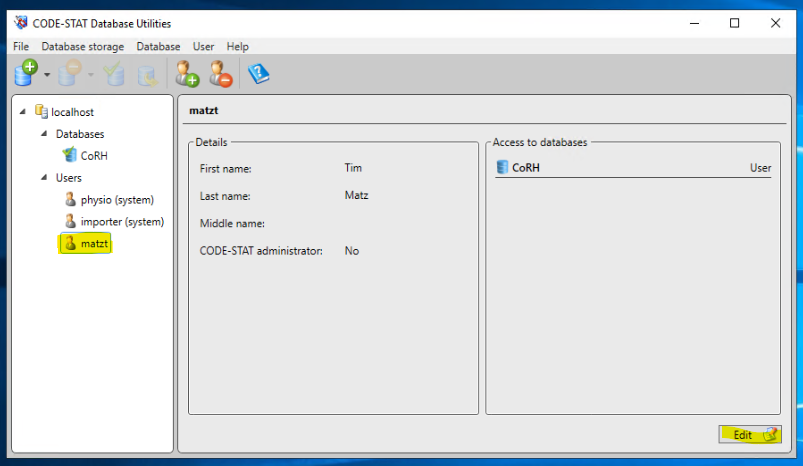
Passwords can be changed for users by using the Database Utilities that were installed with the software.
Click on a user’s name and then “Edit” to change the password. It is recommended that this is done on the user’s machine, so they can choose their own password:
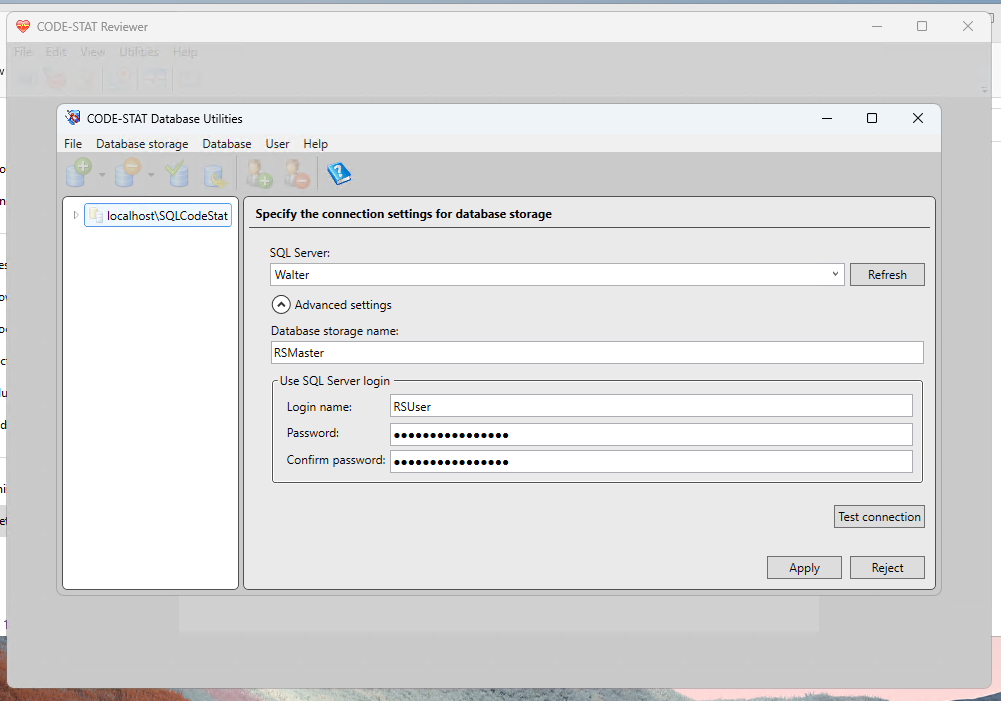
When installing CODE-STAT on a new computer, you will need to set up a database connection via the user’s new computer. Use the following settings (RSUser password is in Dashlane):
Use the following serial and product key when installing to a new computer:
Serial Number: 01069460
Product Key: 4708-00C4-0000-49FC-45DB
Was this article helpful?
That’s Great!
Thank you for your feedback
Sorry! We couldn't be helpful
Thank you for your feedback
Feedback sent
We appreciate your effort and will try to fix the article