
MIS Department Policy & Procedure
Gmail Group - Users want to send emails as the Group
This is the process if some group members want the option to send emails on behalf of the group with the Group Name showing in the From line rather than the email of the individual user.
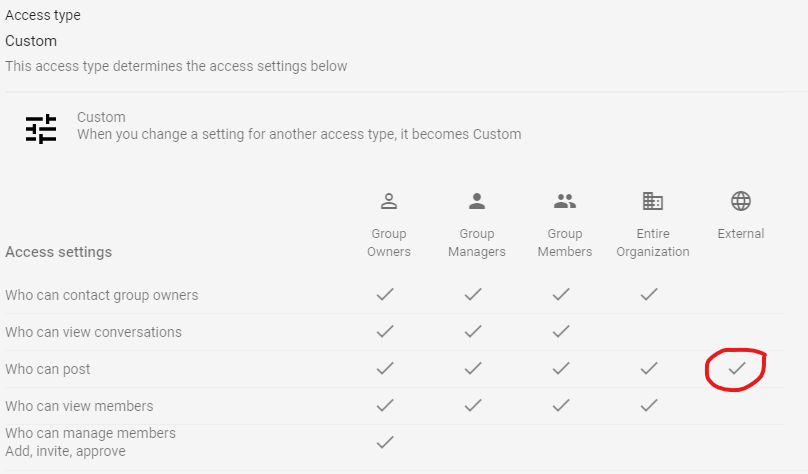
Change Group Setting to Allow External Posts
If a member or members of a Google Group want to be able to send emails as that group, you need to temporarily change the Access Settings to allow External posts (screenshot below):
Send Instructions to the Specific Users
It is important that they make the change and then let you know as soon as possible so you can change the above setting back. We don’t want to leave an internal group open to external posts for very long.
This is an example of an email with instructions to the users on what changes are necessary in their email settings.
NOTE: An email with a verification code will be sent to all members of the group. We can change this. But no one but the original user can utilize the verification code.
Was this article helpful?
That’s Great!
Thank you for your feedback
Sorry! We couldn't be helpful
Thank you for your feedback
Feedback sent
We appreciate your effort and will try to fix the article