Margaret Casey <caseym@rochesterhills.org> Emailing as the Safety Committee: Settings Instructions

Margaret Casey <caseym@rochesterhills.org> Fri, Sep 23, 2022 at 8:00 AM To: Leslie VanGieson <vangiesonl@rochesterhills.org>, Celeste Mansour <mansourc@rochesterhills.org> Cc: Rochelle Lyon <lyonr@rochesterhills.org>, Sarah Olson <olsons@rochesterhills.org>, Chelsea Ditz <ditzc@rochesterhills.org>
Hello ladies. Following are the instructions for setting up your Gmail account so you can send emails as the Safety Committee. If you run into any trouble, just give me a holler.
Also, please let me know as soon as you're done because I need to change a group permission for security reasons. Thanks!
---------------
From your mailbox, click the Settings cog in the upper right of your Inbox.

Choose See all settings
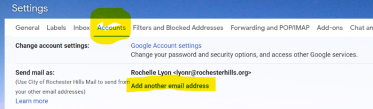
Click on Accounts
In "Send mail as:" click Add another email address
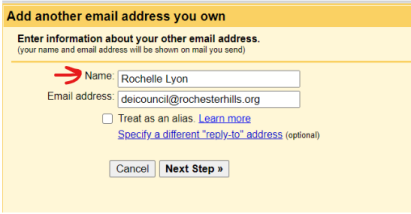
A yellow-ish popup box will open. Type in safetycommittee@rochesterhills.org. Make sure "Treat as alias" is NOT checked.
When you are setting the email address, change the "Name" to what you want to appear when everyone gets the email messages. Safety Committee, or whatever you want it to say. You two may want to change it to the same thing in your settings for consistency.
Click Next Step
Click the Send Verification button.
Leave that small popup window open and go back to your inbox. A verification email will come to your inbox (and everyone else in your group--don't worry, they can't claim your verification code. Only you can from your mailbox.) Open it and copy the code that is in the email.
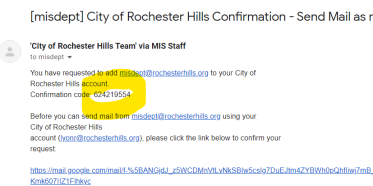
Go back to the popup window that is waiting for the verification code. Paste that code into the "Enter and verify the confirmation code", then click Verify. (If you closed the popup, just go back to Settings, See all settings, Accounts, Send mail as, click the verify link and paste that code in.)
Once this is done, you will now see a box adding a From line in any new email you type. This is where you choose the new group address to send an email as the group.
Again, please let me know so I can make an important change to the permissions of your group. If you have any trouble or questions, please let us know.
Was this article helpful?
That’s Great!
Thank you for your feedback
Sorry! We couldn't be helpful
Thank you for your feedback
Feedback sent
We appreciate your effort and will try to fix the article