JDE: CSV Reports Not Opening Correctly In Excel
1) Browse to & run batch file G:\Install\mistools\client\registry\JDE_EXPORT_CSV\run.bat, clicking
"Yes" / "OK" to confirm the 3 registry imports.
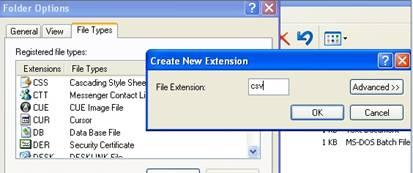
2) Double-click and click "Tools/Folder Options", then click the "File Types" tab.
4) Click "New", and enter csv for "File Extension", and then click the Advanced button.
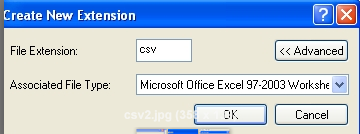
5) For Associated File Type select Microsoft Excel 97-2003 Worksheet and click “OK”.
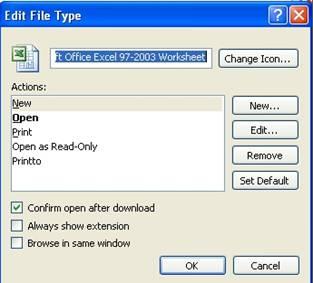
6) Once back on the Registered file types list click the Change button and deselect “Confirm open after download” so the user won’t be prompted to Open / Save / Cancel before Excel opens, click “OK.
Was this article helpful?
That’s Great!
Thank you for your feedback
Sorry! We couldn't be helpful
Thank you for your feedback
Feedback sent
We appreciate your effort and will try to fix the article