Installing Optio 7.8 On Windows XP 5/15/2007
Run G:\Install\optio\designstudio\7.8.22\setup.exe.
Run G:\Install\optio\designstudio\7.8.22\dll-fix\SPEU.exe.
Run G:\Install\optio\designstudio\Textview\setup.exe (installs the text viewer).
Open Optio DesignStudio 7.8: Start/Programs/Optio/DesignStudio 7.8 and click the DesignStudio 7.8 icon.
When prompted for the Server name type in “rh400ifs” and click next (don’t change any of the settings).
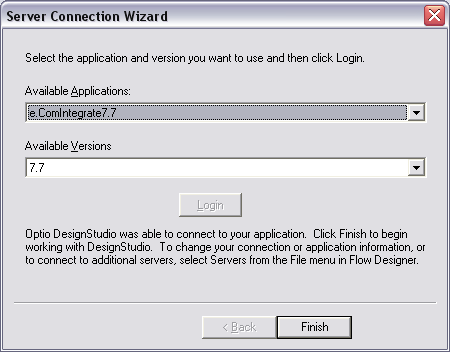
Click the “Connect” button and you should get a message indicating the connection was made successfully. You’ll then be prompted with the following dialog box, click the Login button, and then click Finish.
NOTE: If you can’t connect to the Optio (rh400ifs) server:
Uninstall Design Studio and the Text Viewer.
Reboot the PC.
Reinstall with the steps above, and hopefully you can connect successfully.
Path to the Optio documents on RH400IFS:
\\rh400ifs\c$\Documents and Settings\All Users\Application Data\Optio\OECI\7.7\doc
Was this article helpful?
That’s Great!
Thank you for your feedback
Sorry! We couldn't be helpful
Thank you for your feedback
Feedback sent
We appreciate your effort and will try to fix the article