
MIS Department Policy & Procedure
Environmental Control System #2
This Environmental Control System #2 manages City Hall and the OCSD substation. Will be installed mid 2013.
This system is managed by K&S Ventures
248-299-4212
2653 Auburn Rd, Auburn Hills, MI 48326
Sid Bloomberg
Chris Conley
Hosted server URL
New user interface
https://ksvbms1.ksv.us/login
(Old user interface - http://yourbuilding.ksv.us/login)
Device Internal IP Address of device Firewall S/N Remote IP Address External IP Address on City network Firewall MAC Address WOW Internet
Account#
Hosted Server at K&S N/A N/A 207.91.247.154 (formerly 75.151.10.37)
207.91.247.155 (formerly 75.151.10.38)
75.151.10.41-NOT USED N/A N/A
FX#1
Controller at City Hall 172.20.13.1 N/A N/A 50.200.85.250 N/A
FX#2 Controller at City Hall 172.20.13.2 N/A N/A 50.200.85.251 N/A
K&S IP reservations 172.20.13.10-20
Existing N30
Controller at OCSD
To be removed 172.16.66.15 N/A N/A N/A N/A
FX#1
Contoller at OCSD 172.16.66.10 69.14.190.152
OCSD FW 172.16.66.5 1BU4337G0080A 69.14.190.152
GW 69.14.190.129
Mask 255.255.255.224 N/A 28C68E689A39
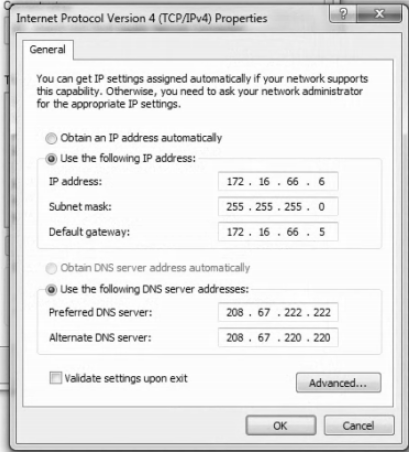
OCSD Energy Mgt PC DP0992 172.16.66.6
GW is 66.5 N/A N/A N/A N/A
Current computer DP1455 as of 9/2022 (replaced DP0992 is using OpenDNS)
User account for Facilities
energymgt
pw=cool-warm2022
Local administrator account is “mis” - check Dashlane for PW
You must use the local admin account for desktop PC's to connect with Logmein
System requires JAVA
WOW! Business Solutions Customers
Please contact us at 1-888-969-4249.
Account number is 012046964
750 Barclay Circle
Holly at support 248-506-5331
Firewall at OCSD
Netgear FVS318
To reset to factory defaults push reset button on back of unit for 15 seconds.
Factory default Username=admin Password=password
Netgear Firewall Login: UN - admin / Password - Firewall#guru17
Firewall can be accessed on ports 1-8 at 172.16.66.5 or www.routerlogin.net from a locally attached computer.
Remote access is accessed on the static IP on HTTPS://69.14.190.152:8080
Remote management is open to city hall addresses 96.27.111.196 and 96.27.111.196.
DHCP scope set to 172.16.66.100 thru 66.120 , mask is 255.255.0.0
The config for the firewall is saved at I:\Net\sysadmin\Firewall\NetgearFirewallBackup\OCSD
If the firewall is replaced WOW will have to be contacted and notified of the new MAC address for the internet port of the firewall so they can reassign the static IP address associated with the firewall to the new MAC address. Vince has the contact info for WOW and the account numbers.
Below is the CURRENT RULESET on the Netgear firewall for OCSD (as of 9/2022 mc)
Inbound Services
# Enable Service Name Action LAN Server IP address WAN Users Log
1 FOXService ALLOW always 172.16.66.10 207.91.247.154 - 207.91.247.155 Never
2 HTTP ALLOW always 172.16.66.10 207.91.247.154 - 207.91.247.155 Never
3 HTTPS ALLOW always 172.16.66.10 207.91.247.154 - 207.91.247.155 Never
4 Platform ALLOW always 172.16.66.10 207.91.247.154 - 207.91.247.155 Never
5 BacNetUDP ALLOW always 172.16.66.10 207.91.247.154 - 207.91.247.155 Never
6 BacNetTCP ALLOW always 172.16.66.10 207.91.247.154 - 207.91.247.155 Never
7 RemoteCFG ALLOW always 172.16.66.10 207.91.247.154 - 207.91.247.155 Never
8 SMTP ALLOW always 172.16.66.10 207.91.247.154 - 207.91.247.155 Never
9 Time ALLOW always 172.16.66.10 207.91.247.154 - 207.91.247.155 Never
Highlighted settings are all disabled per K&S instructions (9/16/2022 mc)
10 FOXService ALLOW always 172.16.66.10 75.151.10.41 Never
11 HTTP ALLOW always 172.16.66.10 75.151.10.41 Never
12 HTTPS ALLOW always 172.16.66.10 75.151.10.41 Never
13 Platform ALLOW always 172.16.66.10 75.151.10.41 Never
14 BacNetUDP ALLOW always 172.16.66.10 75.151.10.41 Never
15 BacNetTCP ALLOW always 172.16.66.10 75.151.10.41 Never
16 RemoteCFG ALLOW always 172.16.66.10 75.151.10.41 Never
17 SMTP ALLOW always 172.16.66.10 75.151.10.41 Never
18 Time ALLOW always 172.16.66.10 75.151.10.41 Never
19 RDP ALLOW always 172.16.66.6 50.200.85.243 Match
20 VNC ALLOW always 172.16.66.6 50.200.85.243 Match
Default Yes Any BLOCK always -- Any Match
Default DMZ Server
172.16.66.0
Respond to Ping on Internet WAN Port
—-----------------------------------------------
OLD RULESET
# Enable Service Name Action LAN Server IP address WAN Users Log
1 FOXService ALLOW always 172.16.66.10 75.151.10.37 - 75.151.10.38 Never
2 HTTP ALLOW always 172.16.66.10 75.151.10.37 - 75.151.10.38 Never
3 HTTPS ALLOW always 172.16.66.10 75.151.10.37 - 75.151.10.38 Never
4 Platform ALLOW always 172.16.66.10 75.151.10.37 - 75.151.10.38 Never
5 BacNetUDP ALLOW always 172.16.66.10 75.151.10.37 - 75.151.10.38 Never
6 BacNetTCP ALLOW always 172.16.66.10 75.151.10.37 - 75.151.10.38 Never
7 RemoteCFG ALLOW always 172.16.66.10 75.151.10.37 - 75.151.10.38 Never
8 SMTP ALLOW always 172.16.66.10 75.151.10.37 - 75.151.10.38 Never
9 Time ALLOW always 172.16.66.10 75.151.10.37 - 75.151.10.38 Never
10 FOXService ALLOW always 172.16.66.10 75.151.10.41 Never
11 HTTP ALLOW always 172.16.66.10 75.151.10.41 Never
12 HTTPS ALLOW always 172.16.66.10 75.151.10.41 Never
13 Platform ALLOW always 172.16.66.10 75.151.10.41 Never
14 BacNetUDP ALLOW always 172.16.66.10 75.151.10.41 Never
15 BacNetTCP ALLOW always 172.16.66.10 75.151.10.41 Never
16 RemoteCFG ALLOW always 172.16.66.10 75.151.10.41 Never
17 SMTP ALLOW always 172.16.66.10 75.151.10.41 Never
18 Time ALLOW always 172.16.66.10 75.151.10.41 Never
Default Yes Any BLOCK always -- Any Match
PC IP4 settings
See attachments below for ports that need to be open from K&S servers to FX controllers.
NetworkingITGuide - Kevin Krajewski, Aug 9, 2013, 2:37 PM
RochHills TRIDIUM PORTS - Kevin Krajewski, Aug 9, 2013, 2:37 PM
Comments:
Margaret Casey - K&S notified us of new IP addresses, which were changed on the Netgear firewall (see settings above). 9/15/2022
Kevin Krajewski
Nov 17, 2017
11/17/2017 Updated PC with all WIndows updates and JAVA update. Reset shortcuts to the new user interface. Called WOW out for modem replacement. Everything is operational now.
Was this article helpful?
That’s Great!
Thank you for your feedback
Sorry! We couldn't be helpful
Thank you for your feedback
Feedback sent
We appreciate your effort and will try to fix the article