
MIS Department Policy & Procedure
If bd.net is throwing MSDTC errors, you can uninstall and reinstall the service.
Uninstall MSDTC
From a command prompt type MSDTC –uninstall and press Enter
Reinstall MSDTC
From a command prompt type MSDTC –install and press Enter
Adjust Local DTC settings in Component Services
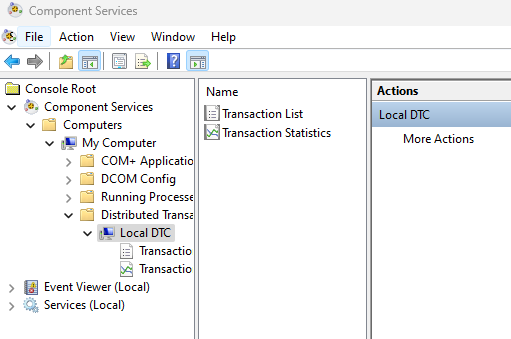
Open Component Services and go to . . .
Computers
My Computer
Distributed Transaction Coordinator
Local DTC [right click]
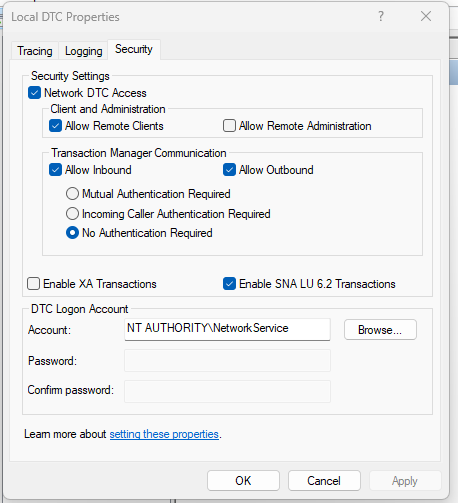
Choose the Security tab and match the settings below
Click Apply and then OK
Change MSDTC service from Manual to Automatic
Launch Services
Search for Distributed Transaction Coordinator
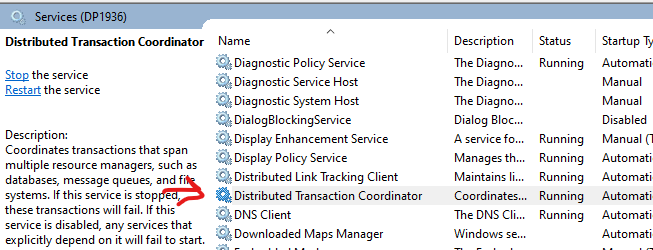
Right click and choose Properties
Change to Automatic
Click Apply and Ok
Was this article helpful?
That’s Great!
Thank you for your feedback
Sorry! We couldn't be helpful
Thank you for your feedback
Feedback sent
We appreciate your effort and will try to fix the article