Your Bank of America Merrill Lynch Image Lockbox Encrypted CD-ROM Instructions
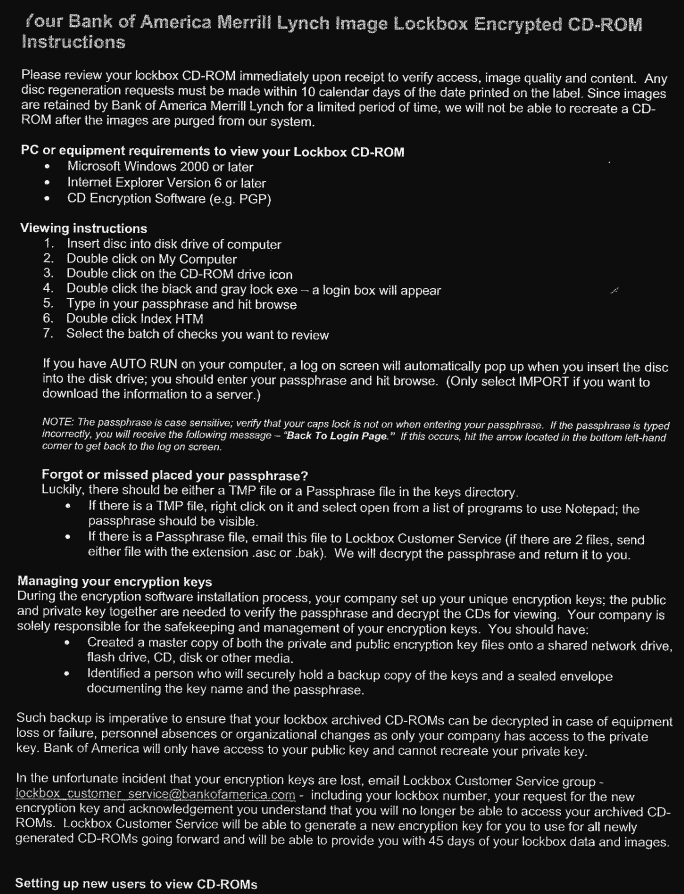
Please review your lockbox CD-ROM immediately upon receipt to verify access, image quality and content. Any disc regeneration requests must be made within 10 calendar days of the date printed on the label. Since images are retained by Bank of America Merrill Lynch for a limited period of time, we will not be able to recreate a CD- ROM after the images are purged from our system.
PC or equipment requirements to view your Lockbox CD-ROM
* Microsoft Windows 2000 or later
Internet Explorer Version 6 or later CD Encryption Software (e.g. PGP)
Viewing instructions
1. Insert disc into disk drive of computer
2. Double click on My Computer
3.
Double click on the CD-ROM drive icon
4. Double click the black and gray lock exe - a login box will appear
5.
Type in your passphrase and hit browse
6.
Double click Index HTM
7.
Select the batch of checks you want to review
If you have AUTO RUN on your computer, a log on screen will automatically pop up when you insert the disc into the disk drive; you should enter your passphrase and hit browse. (Only select IMPORT if you want to download the information to a server.)
NOTE: The passphrase is case sensitive; verify that your caps lock is not on when entering your passphrase. If the passphrase is typed incorrectly, you will receive the following message - "Back To Login Page." If this occurs, hit the arrow focated in the bottom left-hand comer to get back to the log on screen.
Forgot or missed placed your passphrase?
Luckily, there should be either a TMP file or a Passphrase file in the keys directory.
If there is a TMP file, right click on it and select open from a list of programs to use Notepad; the passphrase should be visible.
If there is a Passphrase file, email this file to Lockbox Customer Service (if there are 2 files, send either file with the extension .asc or .bak). We will decrypt the passphrase and return it to you.
Managing your encryption keys
During the encryption software installation process, your company set up your unique encryption keys; the public and private key together are needed to verify the passphrase and decrypt the CDs for viewing. Your company is solely responsible for the safekeeping and management of your encryption keys. You should have:
Created a master copy of both the private and public encryption key files onto a shared network drive, flash drive, CD, disk or other media.
Identified a person who will securely hold a backup copy of the keys and a sealed envelope documenting the key name and the passphrase.
Such backup is imperative to ensure that your lockbox archived CD-ROMs can be decrypted in case of equipment loss or failure, personnel absences or organizational changes as only your company has access to the private key. Bank of America will only have access to your public key and cannot recreate your private key.
In the unfortunate incident that your encryption keys are lost, email Lockbox Customer Service group - lockbox customer service@bankofamerica.com - including your lockbox number, your request for the new encryption key and acknowledgement you understand that you will no longer be able to access your archived CD- ROMs. Lockbox Customer Service will be able to generate a new encryption key for you to use for all newly generated CD-ROMs going forward and will be able to provide you with 45 days of your lockbox data and images.
Setting up new users to view CD-ROMs
PDF Version in case some of the words were mixed up in translation by google docks (first word that is cut off is an example)
Was this article helpful?
That’s Great!
Thank you for your feedback
Sorry! We couldn't be helpful
Thank you for your feedback
Feedback sent
We appreciate your effort and will try to fix the article