
MIS Department Policy & Procedure
Post Election (Receiving Laptops Back)
Log into ELECTIONPDQ server as the pollbook user via RDP (same password as the pollbook laptops).
Open PDQ Deploy and run the following steps in order. This resets the pollbook laptop back to its defaults. BE CERTAIN YOU ARE RUNNING EACH STEP AS THE CORRECT DEPLOY USER:
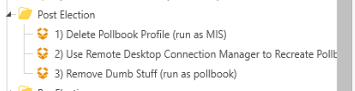
NOTE: Removing the Election Pollbook software from the state is a manual process and should be handled by the Clerks office.
Pre Election (Sending Laptops Out)
Log into ELECTIONPDQ server as the pollbook user via RDP (same password as the pollbook laptops).
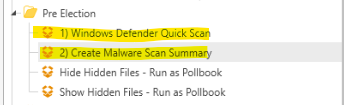
Run the numbered steps in order to perform a Malware scan: (Run step 2 with electionpdq as the target, not the laptops.)
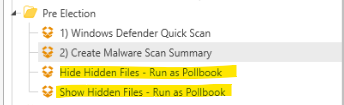
As required by the Clerks office, use the other steps to either hide or show hidden files, depending on what they want:
Was this article helpful?
That’s Great!
Thank you for your feedback
Sorry! We couldn't be helpful
Thank you for your feedback
Feedback sent
We appreciate your effort and will try to fix the article