
MIS Department Policy & Procedure
Producing Emails for FOIA Requests
Google Vault Admin (or Super Admin) must perform the search. Search requests should go to the MIS Director or Deputy Director. Get clearance from one of them before conducting a Vault Search.
Perform Google Vault Search
Export results
Download MBOX file
Use a flash drive to move the MBOX files to the dedicated FOIA Laptop and use Thunderbird to extract emails and attachments:
Point Thunderbird at Your MBOX File
Click menu > Options, Account Settings.
On the Account Settings screen, click “Local Folders.”
Under Message Storage, click the “Browse” button to the right of Local Directory.
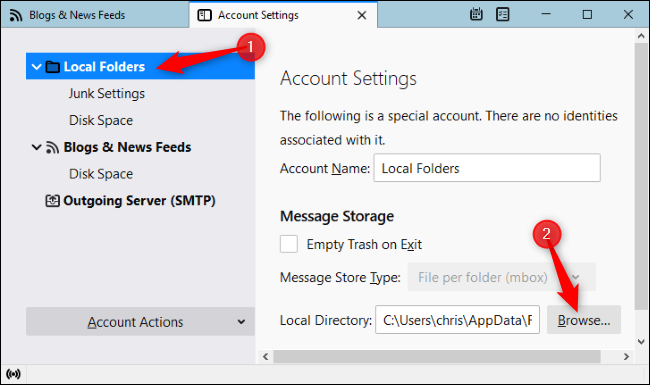
Browse to the folder containing your MBOX file and click “Select Folder.” For example, if your MBOX file is located in C:\Users\[Name]\Downloads\Takeout\Mail, browse to that “Mail” folder and click “Select Folder.”
Thunderbird will tell you it needs to restart. Click “Restart.”
Browse the Contents of Your MBOX File
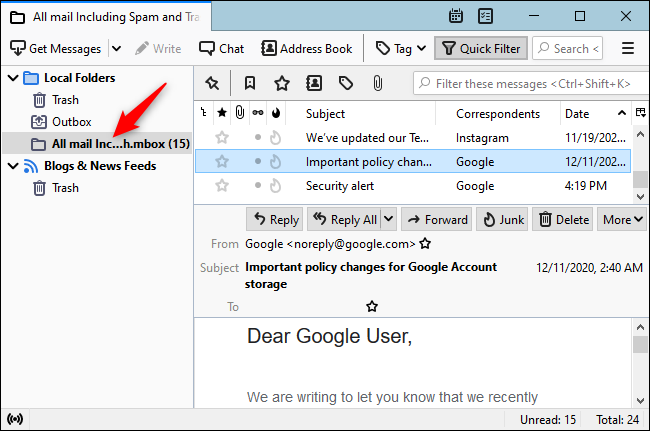
You can now view the contents of your MBOX file in Thunderbird. You’ll see the name of the MBOX file under “Local Folders” in Thunderbird. Click it and you can browse the contents of the MBOX file like you would browse another email inbox.
Provide the laptop to the individual assigned to review the emails.
Produce the FOIA emails
Once the emails to be included have been identified, export them as PDF files, including attachments and combine into a single PDF document.
Print if requested or provide the file on a flash drive.
Create a memo describing the process followed including the information below
Email to users:
Send the following email to users with appropriate information:
The Google Drive folder [insert shared folder] contains the contents for an email search for the 20xx-xxx FOIA regarding _____.
The search was conducted for the time period mm/dd/yyyy through mm/dd/yyyy
The search terms used were "____"
The email account searched was [insert email account(s)]
The search returned xxx emails
The Google Drive folder "FOIA Request 20xx-xxx" contains TXT files for each email.
If an email contains attachments, an attachment subfolder will be identified within the email.
You can review the emails and remove any that do not conform to the request.
Laura Douglas can then download the remaining emails, ZIP them and deliver them to the requestor. She has access to this folder as does Leanne and Sheila.
The search took xx minutes/hours to complete.
Optional text:
“Please be advised that the email search performed may not have produced all relevant information. If an email did not contain the word(s) ____ or ____it would not be included in the search results. If you have knowledge of email you may have sent or received relevant to the FOIA request which did not specifically contain the word “___” or “_____”, you must produce those emails independently from the search I have conducted.”
Was this article helpful?
That’s Great!
Thank you for your feedback
Sorry! We couldn't be helpful
Thank you for your feedback
Feedback sent
We appreciate your effort and will try to fix the article